> For the complete documentation index, see [llms.txt](https://rtkdocs.geodnet.com/llms.txt). Markdown versions of documentation pages are available by appending `.md` to page URLs; this page is available as [Markdown](https://rtkdocs.geodnet.com/ppk-service/quick-start.md).
# Quick Start
## **Prerequisites**
* `curl` and `jq` are installed.
* You have a valid GEODNET PPK `username` and `password`.
* Examples use Bash syntax; adjust for PowerShell as needed.
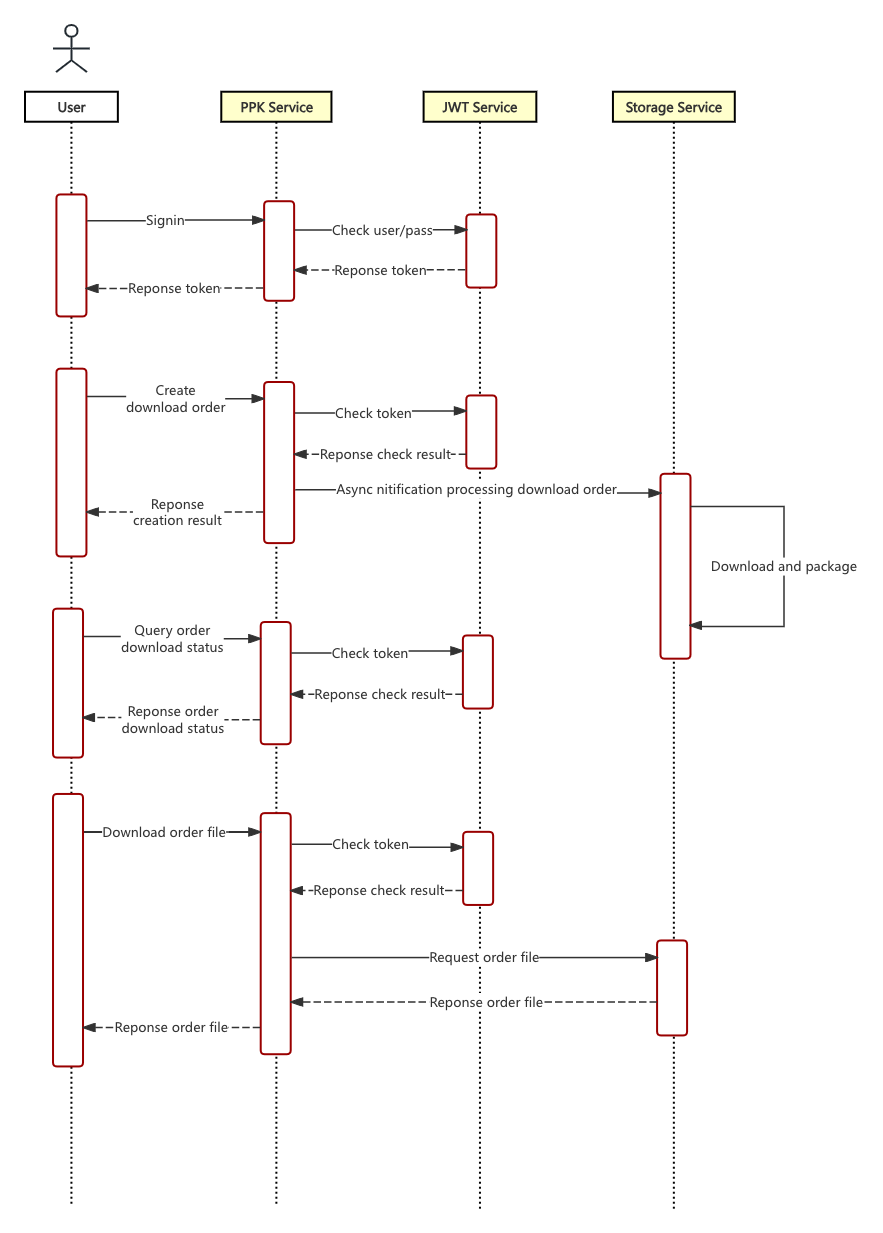
### **(1) Sign in to obtain token**
```sh
TOKEN=$(curl -s -X POST "https://ppk.geodnet.com/api/user/signin" \
-H "Content-Type: application/json" \
-d '{"username":"geoduser","password":"geodpass"}' | jq -r '.data.token')
```
### **(2) Create download order**
```sh
ORDER=$(curl -s -X POST "https://ppk.geodnet.com/api/user/download" \
-H "Content-Type: application/json" \
-H "token: $TOKEN" \
-d '{"startYear":2024,"startMonth":6,"startDay":22,"startHour":0,"endYear":2024,"endMonth":6,"endDay":23,"endHour":0,"stations":["G001"],"type":2}' \
| jq -r '.data.orderId')
```
{% hint style="success" %}
**Note**
Steps are identical for NRCAN results, except step 2 uses `/api/user/estimation/download` with `startDate`, `endDate`, `station`.
{% endhint %}
### **(3) Poll status until completed**
```sh
while true; do
STATUS=$(curl -s "https://ppk.geodnet.com/api/download/status/$ORDER" -H "token: $TOKEN" | jq -r '.data.status')
if [ "$STATUS" = "2" ]; then
echo "Completed"
break
elif [ "$STATUS" = "3" ]; then
echo "Failed"
exit 1
else
echo "Processing..."
sleep 5
fi
done
```
Status values: 1 = Processing, 2 = Completed, 3 = Failed.
### **(4) Download file**
```powershell
curl -L "https://ppk.geodnet.com/api/download/$ORDER" -H "token: $TOKEN" -o "geodnet_${ORDER}.zip"
```
### **(5) Convert to RINEX**
Download the open-source convert tool: [rtklib\_lte](https://github.com/geodnet/rtklib_lte). The Windows binary includes `convbin.exe`; build the project for Linux or macOS.
{% hint style="success" %}
**Note**
year, mon, day, hour, min, sec are the approximate time of the RTCM log file (not the time you download the file). use `-v 2.11` to output rinex 2.11 legacy version.
{% endhint %}
```sh
convbin.exe -r rtcm3 -tr year/mon/day hour:min:sec unziped_rtcm_file
```
---
# Agent Instructions
This documentation is published with GitBook. GitBook is the documentation platform designed so that both humans and AI agents can read, navigate, and reason over technical content effectively. Learn more at gitbook.com.
## Querying This Documentation
If you need additional information that is not directly available in this page, you can query the documentation dynamically by asking a question.
Perform an HTTP GET request on the current page URL with the `ask` query parameter, and the optional `goal` query parameter:
```
GET https://rtkdocs.geodnet.com/ppk-service/quick-start.md?ask=&goal=
```
`ask` is the immediate question: it should be specific, self-contained, and written in natural language.
`goal` is optional and describes the broader end goal you are ultimately trying to accomplish on behalf of the user. GitBook uses it to tailor the answer towards what is most useful for that goal.
The response will contain a direct answer to the question and relevant excerpts and sources from the documentation.
Use this mechanism when the answer is not explicitly present in the current page, you need clarification or additional context, or you want to retrieve related documentation sections.