> For the complete documentation index, see [llms.txt](https://rtkdocs.geodnet.com/llms.txt). Markdown versions of documentation pages are available by appending `.md` to page URLs; this page is available as [Markdown](https://rtkdocs.geodnet.com/gga-service/quick-start.md).
# Quick Start
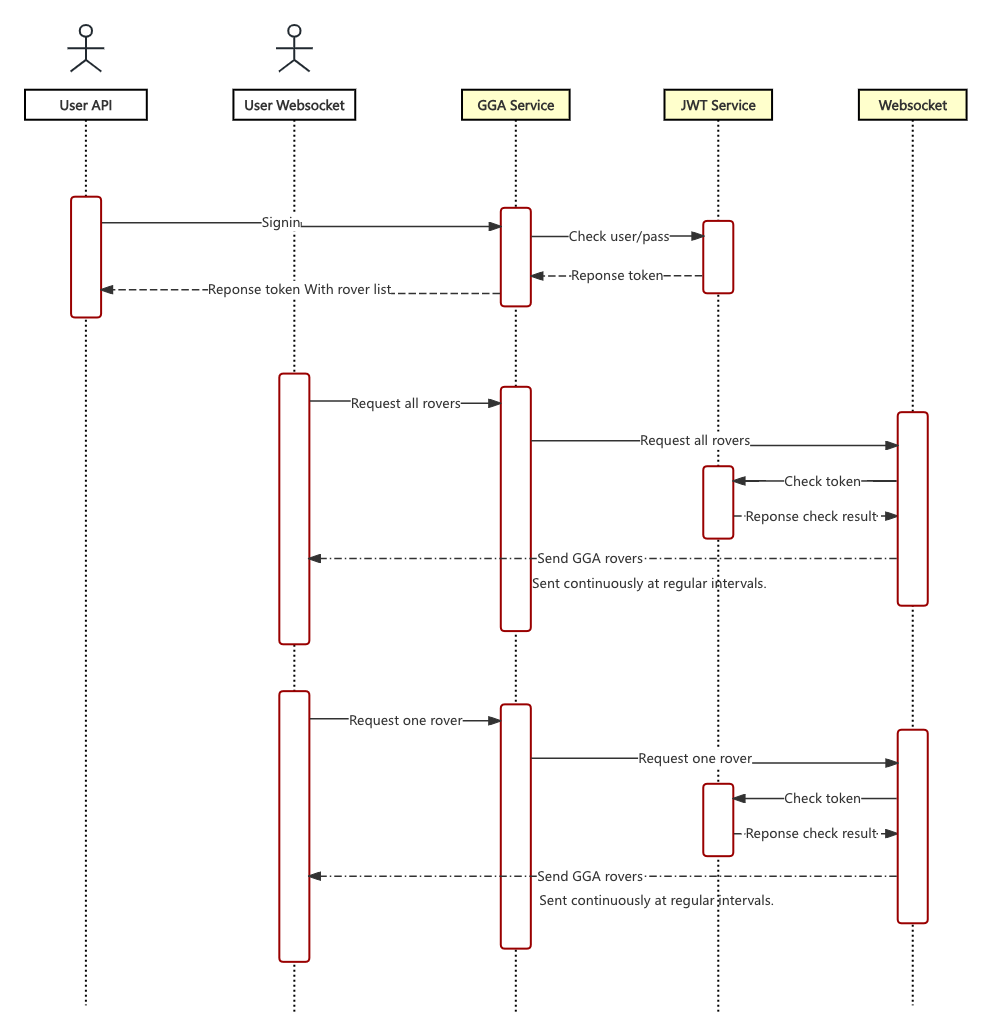
1. **Sign in** to get a token
* Make a POST request to `/rover/v1/user/login` with your credentials.
* Receive a Bearer token and an optional list of rover session IDs.
2. **Connect WebSocket with Authorization**
* All rovers: `wss://nmea.geodnet.com/rover/v1/subscribe/all`
* Single rover: `wss://nmea.geodnet.com/rover/v1/subscribe/:id`
* Include header `Authorization: Bearer `
3. **Receive GGA data**
* Messages are JSON with fields `code`, `msg` (optional), and `data`.
* `data` is an array of objects: `{ id, data }` where `data` is NMEA 0183 GGA strings.
4. **Handle errors and reconnection**
* If you get `code = 10005` (Invalid token), re-login and refresh the token.
* Use exponential backoff for reconnects.
5. **Optional: Filter by a specific rover ID**
* Choose one `id` from login response’s `data.rovers` or other sources and connect to the single-rover endpoint.